
14 KiB
Stable Diffusion Python WebUI
This project is based on a script from https://github.com/imanslab/poc-uncensored-stable-diffusion/
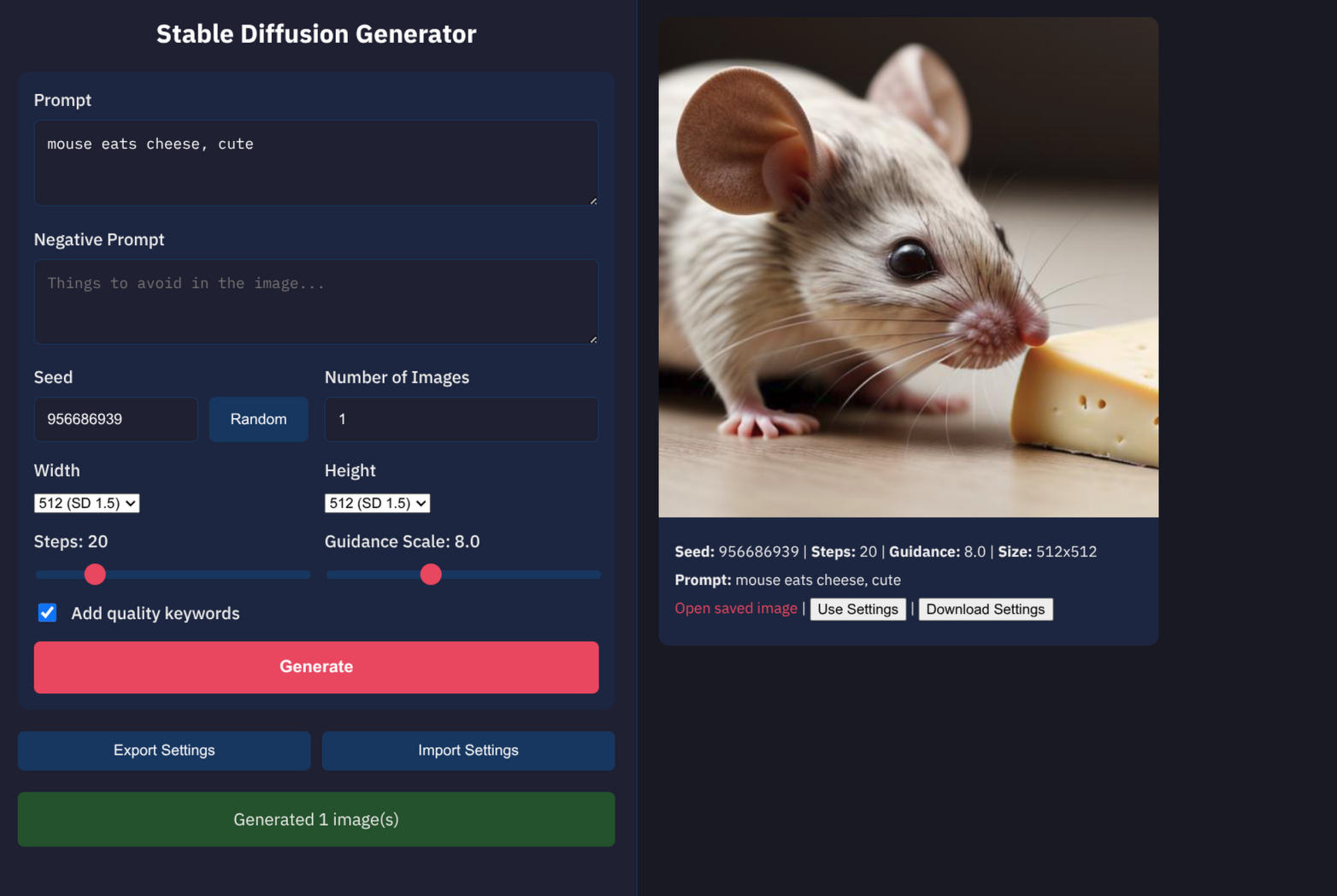
A local web interface for generating images with Stable Diffusion, designed for fast iteration with the model kept loaded in memory.
This is basically a very simplified reimplementation of Automatic1111
This README will guide you through setup and basic usage.
Warning A lot of this project was made with claude code because I just wanted to have a working SD webui and Automation1111 refused to work for me. The whole thing was made in two days. This is not aiming to be a maintainable project. It's best to run claude, tell it to read this README and have it make the changes you want.
I have AMD RX 6600 XT, which is not supported by ROCm, but works fine with HSA_OVERRIDE_GFX_VERSION=10.3.0 in env. That essentially lies about the GPU you have, and somehow a lie is sufficient here. Welcome to ML python.
This will work best with NVIDIA, but you will need some adjustments as I optimized it for my AMD card.
Legal Disclaimer
THIS GENERATOR IS FOR LOCAL USE ONLY AND MUST NOT BE EXPOSED TO THE INTERNET
- No Responsibility: The creators of this project bear no responsibility for how the software is used.
- An uncensored model has no guardrails.
- You are responsible for anything you do with the tool and the model you downloaded, just as you are responsible for anything you do with any dangerous object.
- Publishing anything this model generates is the same as publishing it yourself.
- Ensure compliance with all applicable laws and regulations in your jurisdiction.
- If you unintentionally generate something illegal, delete it immediately and permanently (not to recycle bin)
- All pictures are saved in the
out/folder - Clear browser cache and other relevant caches
- All pictures are saved in the
Safety checker
Some models have a built-in safety (NSFW) checker. You can try enabling it, but in my experience, it blacks out even totally safe results.
By default, safety checker is disabled. To enable it, remove this piece from the pipeline: , safety_checker=None
e.g. in StableDiffusionPipeline.from_pretrained(model_id, torch_dtype=torch.float16, safety_checker=None)
Prerequisites
- Python 3.11+
- Compatible GPU (default config is for AMD with ROCm) - ROCm must be installed system-wide
Optional:
- Git
- Git LFS (Large File Storage) - Required for downloading models. Install from git-lfs.github.com
Setup
Create directories
- models
- lora (if using)
- out
these are in gitignore.
Install Python dependencies
# Create Virtual Environment
python -m venv .venv
source .venv/bin/activate

# Install Dependencies
pip install -r requirements.txt
You may need to edit the requirements file to fit your particular setup.
You also need system-wide install of ROCm and amdgpu.ids - it will complain if they are missing
Download a model
Models go in the models/ directory.
Supported formats:
.safetensors- Single-file safetensors format.ckpt- Single-file checkpoint format- Directory - Diffusers pretrained model directory
You can use any Stable Diffusion 1.5 or SDXL model.
The simplest way is to download them from civitai.com (safetensors format)
For diffusers format (e.g. from Huggingface.co), e.g.:
https://huggingface.co/stablediffusionapi/realistic-vision-v51
mkdir -p models
cd models
git lfs install # Needed once

# Download using git lfs
git clone https://huggingface.co/stablediffusionapi/realistic-vision-v51
Configuration
Model Configuration
Use environment variables to configure which model to load:
| Variable | Values | Default | Description |
|---|---|---|---|
SD_MODEL_PATH |
path | ./models/my-diffusers-model |
Path to model file or directory |
SD_MODEL_TYPE |
sd15, sdxl |
sd15 |
Model architecture type |
SD_LOW_VRAM |
1, true, yes |
disabled | Enable for GPUs with <12GB VRAM |
SD_LORA_STACK |
see below | none | LoRA files to load with weights |
# SD 1.5 safetensors file
SD_MODEL_PATH=./models/my_sd15_model.safetensors ./run_web.sh

# SDXL safetensors file
SD_MODEL_TYPE=sdxl SD_MODEL_PATH=./models/my_sdxl_model.safetensors ./run_web.sh

# SDXL on GPU with <12GB VRAM (slower but works)
SD_MODEL_TYPE=sdxl SD_MODEL_PATH=./models/my_sdxl_model.safetensors SD_LOW_VRAM=1 ./run_web.sh

# SD 1.5 ckpt checkpoint file
SD_MODEL_PATH=./models/my_model.ckpt ./run_web.sh

# Diffusers directory (default)
SD_MODEL_PATH=./models/my-diffusers-model ./run_web.sh
LoRA Configuration
Load one or more LoRA files using the SD_LORA_STACK environment variable.
Note: I'm not sure if this actually works, in my experience it more degraded the picture quality.
Format: path/to/lora.safetensors:WEIGHT,path/to/other.safetensors:WEIGHT
- Paths are comma-separated
- Weight is optional (defaults to 1.0)
- Weight range: 0.0 to 1.0+ (higher values = stronger effect)
# Single LoRA with default weight (1.0)
SD_LORA_STACK=./loras/style.safetensors ./run_web.sh

# Single LoRA with custom weight
SD_LORA_STACK=./loras/style.safetensors:0.8 ./run_web.sh

# Multiple LoRAs stacked
SD_LORA_STACK=./loras/style.safetensors:0.7,./loras/character.safetensors:0.5 ./run_web.sh
LoRAs are loaded at startup and applied to all generations. Make sure your LoRAs are compatible with your base model type (SD 1.5 LoRAs for SD 1.5 models, SDXL LoRAs for SDXL models).
Frontend
Frontend constants in templates/index.html, normally this does not need changing.
const CONFIG = {
    GUIDANCE_MIN: 1,
    GUIDANCE_MAX: 20,
    GUIDANCE_SPREAD: 2.5,      // Range spread when syncing to slider
    STEPS_MIN: 1,
    STEPS_MAX: 100,
    STEPS_SPREAD: 15,          // Range spread when syncing to slider
    DEFAULT_TIME_ESTIMATE: 20  // Seconds, for first image progress bar
};
Run the POC to verify config
Download a diffusers model e.g. realistic-vision-v51 using the example above.
Run run_poc.sh (modify it as needed).
It will generate a picture to out/ and open it in your image viewer.
Run the Server
-
Copy
run_web_example.shtorun_web.shand customize the env vars to fit your needs - choice of mode, special options for your GPU etc. -
Start the server
./run_web.sh
Or manually:
source .venv/bin/activate
python app.py
Open http://localhost:5000 in your browser.
Architecture
┌─────────────────────────────────────────────────────────────┐
│                        Browser                              │
│  ┌─────────────────────────────────────────────────────┐    │
│  │  index.html + style.css                             │    │
│  │  - Form controls for generation parameters          │    │
│  │  - Real-time progress bar with ETA                  │    │
│  │  - Streaming image display via SSE                  │    │
│  └─────────────────────────────────────────────────────┘    │
└─────────────────────────┬───────────────────────────────────┘
                          │ HTTP + Server-Sent Events
┌─────────────────────────▼───────────────────────────────────┐
│                     Flask Server (app.py)                   │
│  - GET /           → Serve UI                               │
│  - POST /generate  → Stream generated images via SSE        │
│  - POST /stop      → Signal generation to stop              │
│  - GET /out/<file> → Serve saved images                     │
└─────────────────────────┬───────────────────────────────────┘
                          │
┌─────────────────────────▼───────────────────────────────────┐
│              Pipeline Manager (sd_pipeline.py)              │
│  - Singleton pattern keeps model in GPU memory              │
│  - Thread-safe generation with locking                      │
│  - Yields images one-by-one for streaming                   │
│  - Stop flag checked between images for cancellation        │
└─────────────────────────┬───────────────────────────────────┘
                          │
┌─────────────────────────▼───────────────────────────────────┐
│                    Stable Diffusion Model                   │
│  - Loaded once at startup                                   │
│  - Persists between requests for fast regeneration          │
└─────────────────────────────────────────────────────────────┘
Technologies
| Component | Technology | Purpose |
|---|---|---|
| Backend | Flask | Lightweight Python web framework |
| Frontend | Vanilla HTML/CSS/JS | No build step, minimal dependencies |
| ML Framework | PyTorch + Diffusers | Stable Diffusion inference |
| Streaming | Server-Sent Events (SSE) | Real-time image delivery |
| GPU | CUDA/ROCm | Hardware acceleration |
File Structure
poc-uncensored-stable-diffusion/
├── app.py              # Flask application with routes
├── sd_pipeline.py      # Singleton pipeline manager
├── models.py           # Data classes (GenerationOptions, ImageResult, etc.)
├── templates/
│   └── index.html      # Main UI with embedded JS
├── static/
│   └── style.css       # Styling with dark theme
├── run_web.sh          # Startup script with env vars
├── requirements.txt    # Python dependencies
├── out/                # Generated images output
└── models/             # Model files (SD 1.5, SDXL)
Features
Generation Parameters
- Prompt: Text description for image generation
- Negative Prompt: Things to avoid in the image
- Seed: Reproducible generation (random button generates 9-digit seed)
- Steps: Number of inference steps (1-100, default 20)
- Guidance Scale: CFG scale (1-20, default 7.5)
- Number of Images: Batch generation (1-10)
- Quality Keywords: Optional suffix for enhanced quality
Variation Modes
- Increment Seed: Each image in batch gets seed+1 (default on)
- Vary Guidance: Sweep guidance scale across a range
- Vary Steps: Sweep step count across a range
When vary modes are enabled, the corresponding slider hides and low/high range inputs appear. Range inputs stay synchronized with slider values when vary mode is off.
Progress Indication
- Spinner animation during generation
- Progress bar with percentage and ETA countdown
- First image assumes 20s estimate, subsequent images use measured time
- After 90%, progress slows asymptotically until image arrives
- Measured time persists across generations for accurate estimates
Streaming Results
- Images appear immediately as they complete (Server-Sent Events)
- No waiting for entire batch to finish
- Each image card shows: seed, steps, guidance scale, prompt, link to saved file
Stop Generation
- Stop button appears during batch generation
- Signals the pipeline to stop after the current image completes
- Already-generated images are preserved
- The generation mutex is released, allowing new generations immediately
- Useful when you notice a mistake in your prompt mid-batch
Settings Management
- Export: Download current settings as JSON file
- Import: Load settings from JSON file
- All parameters preserved including vary mode ranges
Responsive Layout
- Narrow screens: Stacked layout (form above results)
- Wide screens (>1200px): Side-by-side layout
- Left panel: Fixed-width control form with scrollbar
- Right panel: Scrollable results grid
Output Files
Each generated image saves two files to out/:
YY-MM-DD_HH-MM-SS_SEED.jpg- The imageYY-MM-DD_HH-MM-SS_SEED.json- Metadata file in a format that can be imported to the web UI to re-apply the settings.
API
POST /generate
Request (JSON):
{
    "prompt": "your prompt",
    "negative_prompt": "things to avoid",
    "seed": 12345,
    "steps": 20,
    "guidance_scale": 7.5,
    "count": 1,
    "width": 512,
    "height": 512,
    "add_quality_keywords": true,
    "increment_seed": true,
    "vary_guidance": false,
    "guidance_low": 5.0,
    "guidance_high": 12.0,
    "vary_steps": false,
    "steps_low": 20,
    "steps_high": 80
}
Response (SSE stream):
data: {"index":1,"total":1,"filename":"...","seed":12345,"steps":20,"guidance_scale":7.5,"width":512,"height":512,"prompt":"...","negative_prompt":"...","full_prompt":"...","url":"/out/...","base64":"data:image/jpeg;base64,..."}

data: {"done":true}
POST /stop
Signals the generation loop to stop after the current image. The frontend also aborts the SSE connection.
Request: Empty body
Response (JSON):
{"success": true}
Implementation notes:
- Sets a
_stop_requestedflag on the pipeline singleton - The generation loop checks this flag before and after each image
- The flag is cleared when generation starts or when stop is processed
- Thread-safe: the flag is checked while holding the generation lock